#> 0.007978686 with absolute error < 3.8e-07#> 0.01248151 with absolute error < 9.4e-09This chapter will cover more on the probability density function (PDF); introduce the cumulative distribution function (CDF), which helps us more easily determine the probability of ranges of values; and introduce quantiles, which divide our probability distributions into parts with equal probabilities. For example, a percentile is a 100-quantile, meaning it divides the probability distribution into 100 equal pieces. (115)
Say you run a blog and want to know the probability that a visitor to your blog will subscribe to your email list. In marketing terms, getting a user to perform a desired event is referred to as the conversion event, or simply a conversion, and the probability that a user will subscribe is the conversion rate.
As discussed in Section 5.2, we would use the beta distribution to estimate p, the probability of subscribing, when we know
k, the number of people subscribed, andn, the total number of visitors. The two parameters needed for the beta distribution areα, which in this case represents the total subscribed (k), andβ, representing the total not subscribed (n – k).
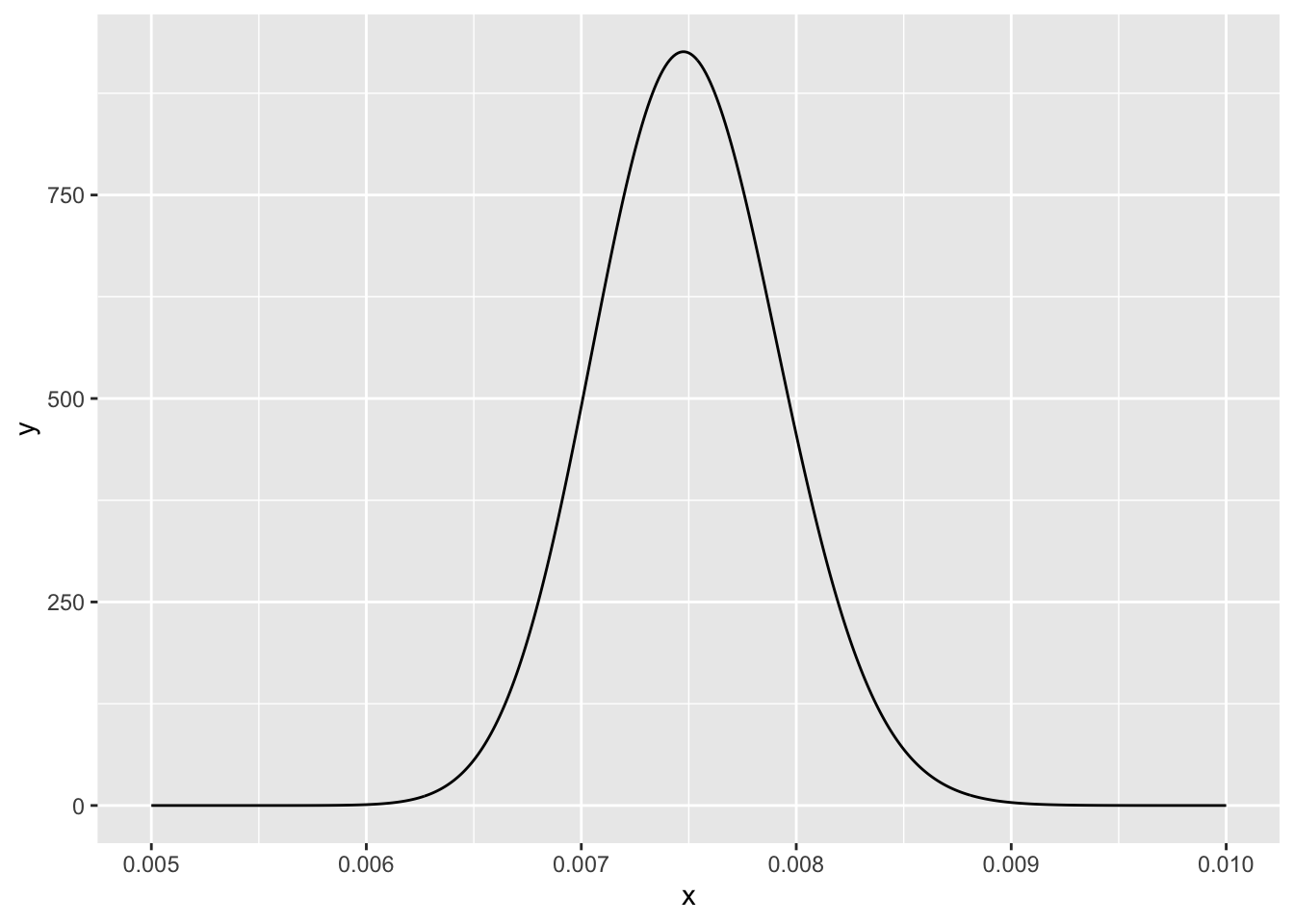
let’s say for the first 40,000 visitors, you get 300 subscribers. The PDF for our problem is the beta distribution where α = 300 and β = 39,700.
Theorem 13.1 (Computing the mean of the beta distribution) \[ \begin{align*} \mu_{Beta} = \frac{\alpha}{\alpha + \beta} \\ \mu_{Beta} = \frac{300}{300 + 39,700} = 0.0075 \end{align*} \tag{13.1}\]
The blog’s average conversion rate is simply \(\frac{subscribed}{visited}\).
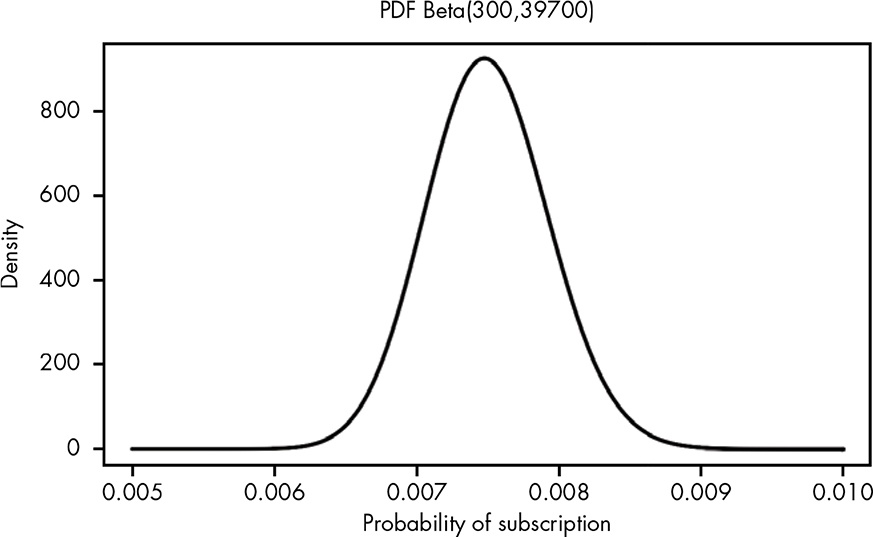
Given that we have uncertainty in our measurement, and we have a mean, it could be useful to investigate how much more likely it is that the true conversion rate is 0.001 higher or lower than the mean of 0.0075 we observed.
#> 0.007978686 with absolute error < 3.8e-07#> 0.01248151 with absolute error < 9.4e-09if we had to make a decision with the limited data we have, we could still calculate how much likelier one extreme is than the other:
#> [1] 1.564357It’s 56 percent more likely that our true conversion rate is greater than 0.0085 than that it’s lower than 0.0065.
I am going to use my own code in Section 13.7.1. But to see what it looks like I use the R base code lines from the book:
we can save ourselves a lot of effort with the cumulative distribution function (CDF), which sums all parts of our distribution, replacing a lot of calculus work. … The CDF takes in a value and returns the probability of getting that value or lower.
The CDF gets this probability by taking the cumulative area under the curve for the PDF (for those comfortable with calculus, the CDF is the anti-derivative of the PDF). We can summarize this process in two steps: (1) figure out the cumulative area under the curve for each value of the PDF, and (2) plot those values. That’s our CDF.
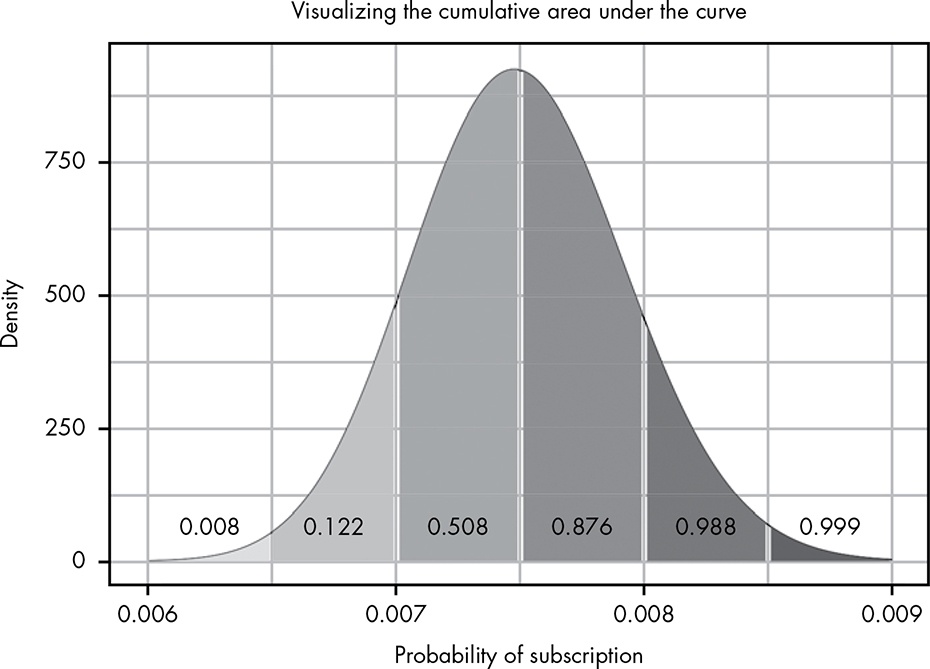
Figure 13.2 shows the cumulative area under the curve for the PDF of Beta(300,39700). As you can see, our cumulative area under the curve takes into account all of the area in the pieces to its left.
Using this approach, as we move along the PDF, we take into account an increasingly higher probability until our total area is 1, or complete certainty. To turn this into the CDF, we can imagine a function that looks at only these areas under the curve.
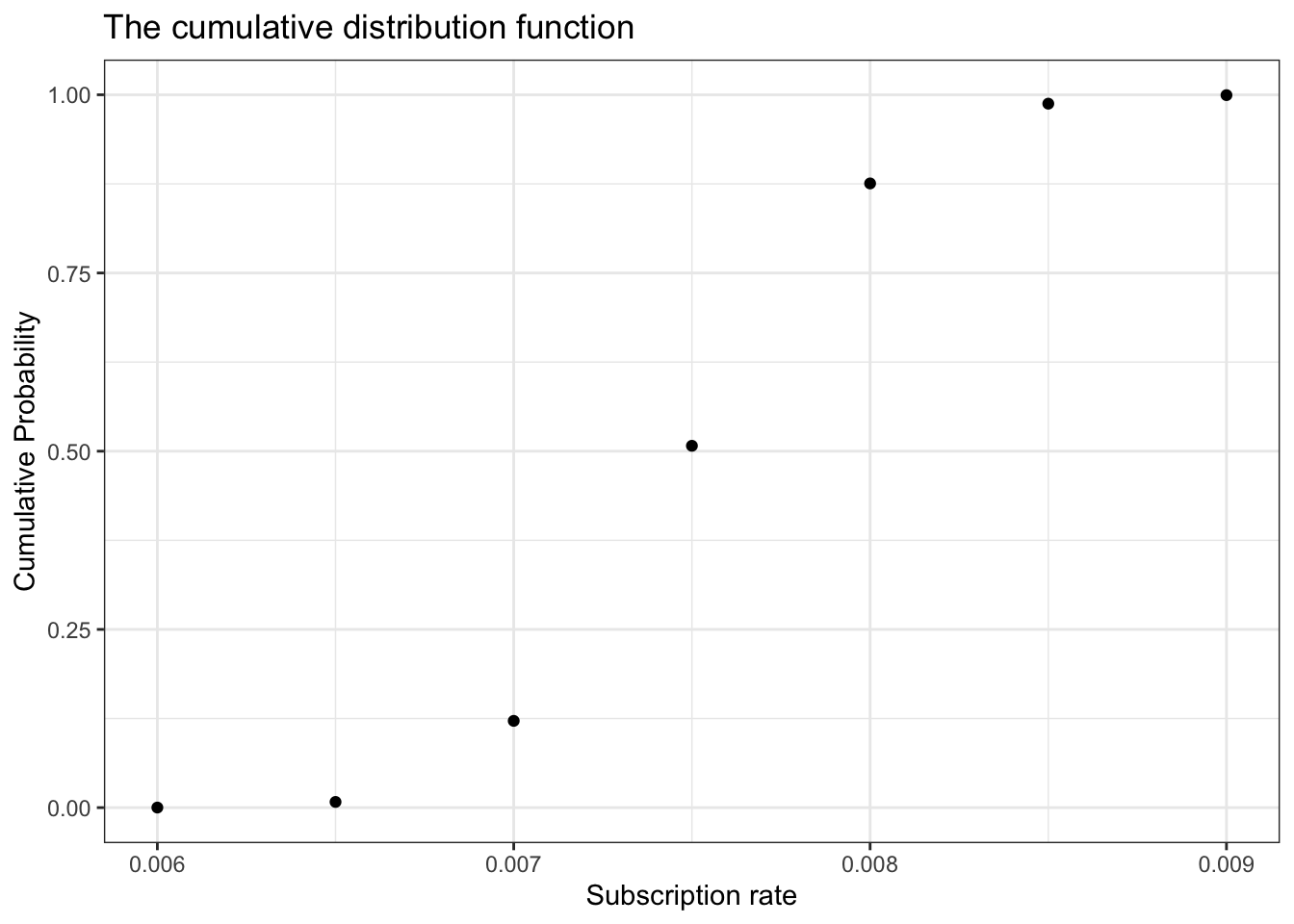
Figure 13.3 shows what happens if we plot the area under the curve for each of our points, which are 0.0005 apart.

Now we have a way of visualizing just how the cumulative area under the curve changes as we move along the values for our PDF. Of course, the problem is that we’re using these discrete chunks. In reality, the CDF just uses infinitely small pieces of the PDF, so we get a nice smooth line as seen in Figure 13.4.
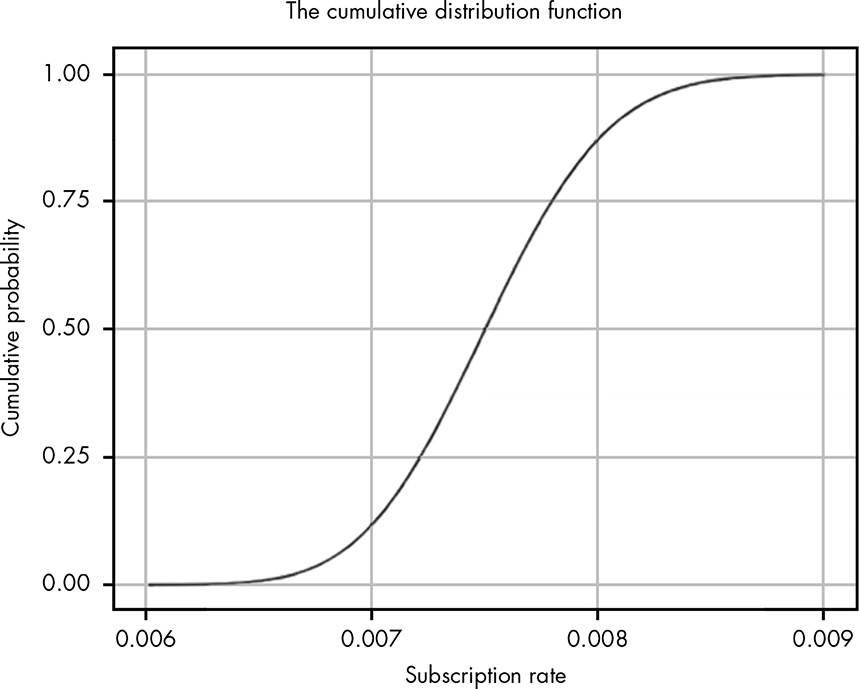
The PDF is most useful visually for quickly estimating where the peak of a distribution is, and for getting a rough sense of the width (variance) and shape of a distribution. However, with the PDF it is very difficult to reason about the probability of various ranges visually. The CDF is a much better tool for this.
Unlike the mean, computing the median can actually be pretty tricky. For small, discrete cases, it’s as simple as putting your observations in order and selecting the value in the middle. But for continuous distributions like our beta distribution, it’s a little more complicated.
Thankfully, we can easily spot the median on a visualization of the CDF. We can simply draw a line from the point where the cumulative probability is 0.5, meaning 50 percent of the values are below this point and 50 percent are above.
There are many packages about the beta functions out there that provides functions for parameter calculation: For instance betamedian() of {betafunctions}. But in a StackOverflow post is the suggestion simple to use qbeta() with p = 0.5.
This is what I have done in replicating Figure 13.5 with my Figure 13.17.

When working with ranges of probabilities, we’ll often want to know the probability that the true value lies somewhere between some value y and some value x.
Time-consuming computation the integration with R is not necessary as we can eyeball whether or not a certain range of values has a very high probability or a very low probability of occurring.
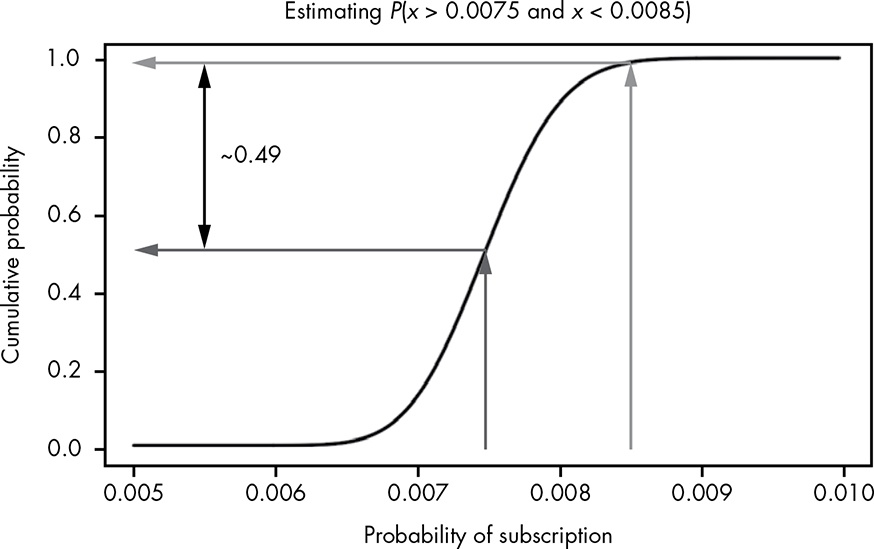
Looking at the probability of ranges of values leads us to a very important concept in probability: the confidence interval. A confidence interval is a lower and upper bound of values, typically centered on the mean, describing a range of high probability, usually 95, 99, or 99.9 percent. When we say something like “The 95 percent confidence interval is from 12 to 20,” what we mean is that there is a 95 percent probability that our true measurement is somewhere between 12 and 20. Confidence intervals provide a good method of describing the range of possibilities when we’re dealing with uncertain information.
In spite of a special note “In Bayesian statistics what we are calling a ”confidence interval” can go by a few other names, such as ”critical region” or ”critical interval.” In some more traditional schools of statistics, ”confidence interval” has a slightly different meaning, which is beyond the scope of this book.” this concept and notions are not correct for Bayesian statistics. At least what I have learned reading other books, especially (McElreath 2020).
Bayesian statistics talks about credible intervals that have a very different meaning as the confidence intervals of frequentist statistics McElreath even proposes the notion of compatibility intervals.
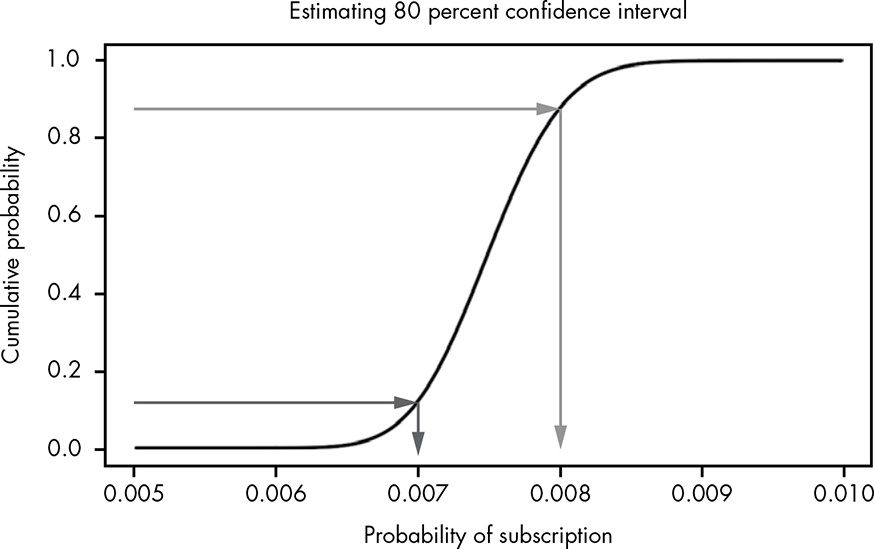
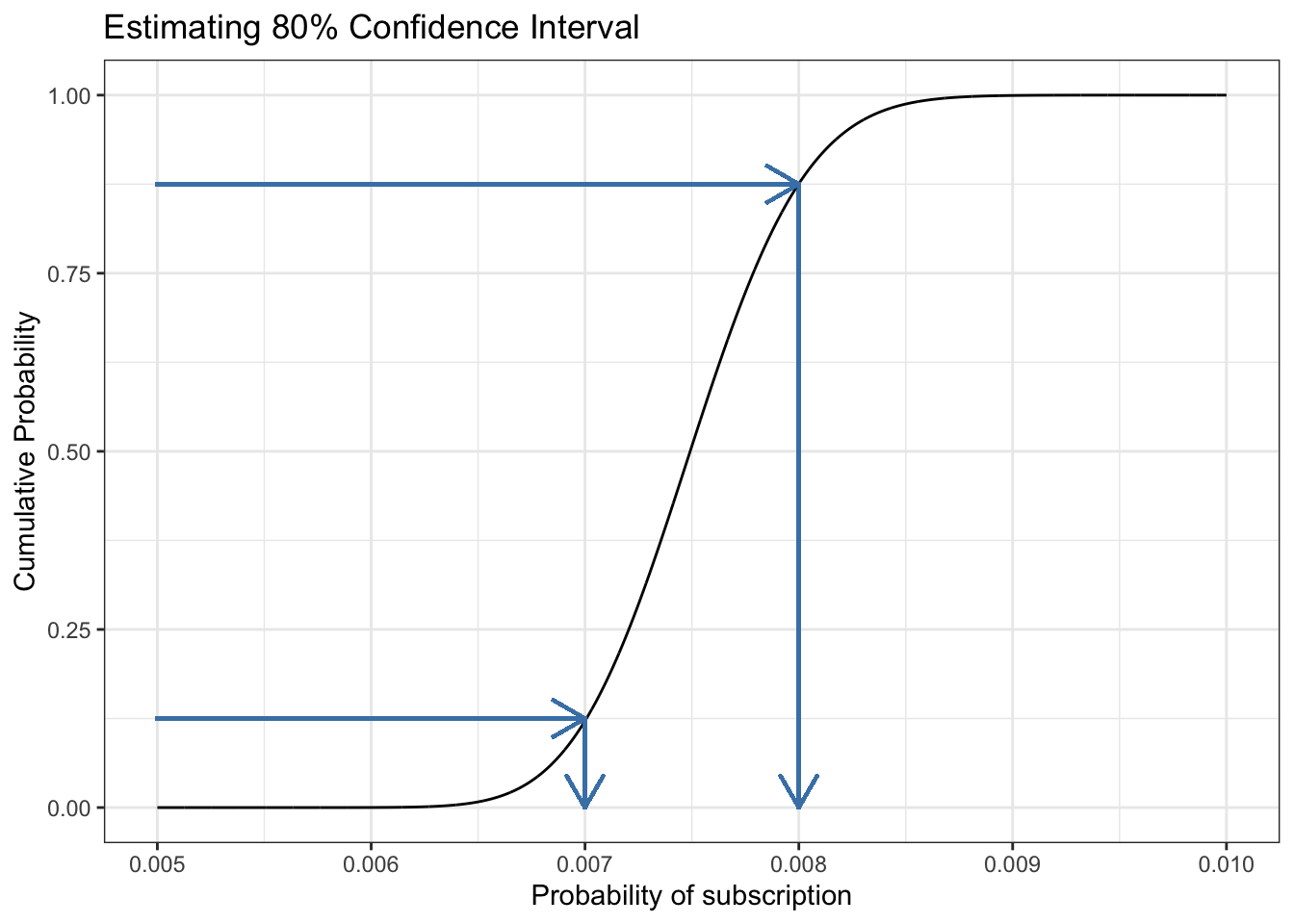
Say we wanted to know the range that covers 80 percent of the possible values for the true conversion rate. We solve this problem by combining our previous approaches: we draw lines at the y-axis from 0.1 and 0.9 to cover 80 percent, and then simply see where on the x-axis these intersect with our CDF:
Just as nearly all major PDFs have a function starting with \(d\), like
dnorm(), CDF functions start with \(p\), such aspnorm().
This is a new information for me. Now I understand better the differences and use cases of the different types of distribution. My comprehension will be fostered with the next section when the application of function starting with \(q\) is explained.
pbeta(0.0065,300,39700)#> [1] 0.007978686#> [1] 0.01248151The great thing about CDFs is that it doesn’t matter if your distribution is discrete or continuous. If we wanted to determine the probability of getting three or fewer heads in five coin tosses, for example, we would use the CDF for the binomial distribution like this:
pbinom(3, 5, 0.5)#> [1] 0.8125Mathematically, the CDF is like any other function in that it takes an \(x\) value, often representing the value we’re trying to estimate, and gives us a \(y\) value, which represents the cumulative probability. But there is no obvious way to do this in reverse; that is, we can’t give the same function a \(y\) to get an \(x\).
But we did reversing the function when we estimated the median in Section 13.3.1.1 respectively in my version in Section 13.7.5.
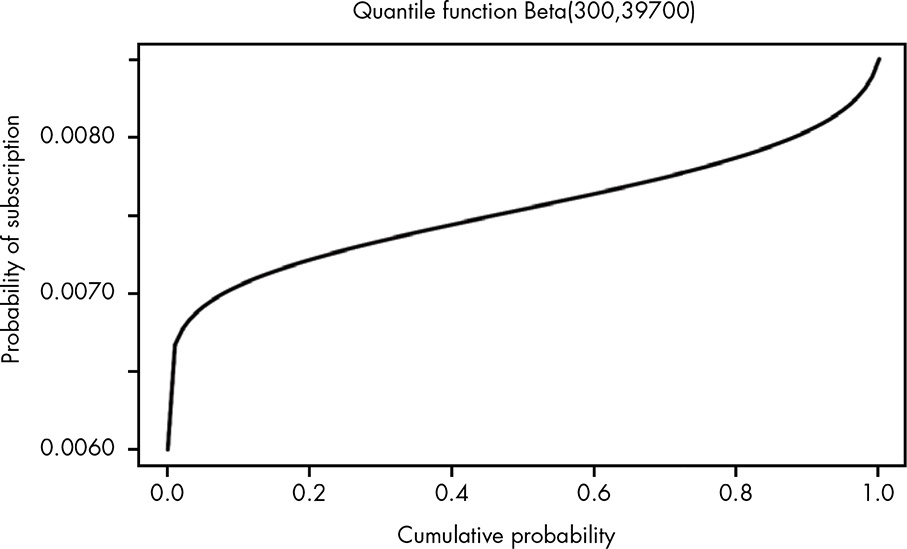
The inverse of the CDF is an incredibly common and useful tool called the quantile function. To compute an exact value for our median and confidence interval, we need to use the quantile function for the beta distribution.
Because the quantile function is simply the inverse of the CDF, it just looks like the CDF rotated 90 degrees, as shown in Figure 13.8.
Whenever you hear phrases like:
- “The top 10 percent of students …”
- “The bottom 20 percent of earners earn less than …”
- “The top quartile has notably better performance than …”
you’re talking about values that are found using the quantile function
We are using the function qnorm() for calculating quantiles.
For example, if we want to know the value that 99.9 percent of the distribution is less than, we can use qbeta() with the quantile we’re interested in calculating as the first argument, and the alpha and beta parameters of our beta distribution as the second and third arguments, like so:
qbeta(0.999, 300, 39700)#> [1] 0.008903462The result is 0.0089, meaning we can be 99.9 percent certain that the true conversion rate for our emails is less than 0.0089.
With the quantile function we can also calculate the 95% confidence interval by finding the lower and upper 2.5% quantile:
glue::glue("The lower bound is {round(qbeta(0.025,300,39700), 7)} and the upper bound is {round(qbeta(0.975,300,39700) ,7)}.")#> The lower bound is 0.0066781 and the upper bound is 0.0083686.Now we can confidently say that we are 95 percent certain that the real conversion rate for blog visitors is somewhere between 0.67 percent and 0.84 percent. … Suppose an article on your blog goes viral and gets 100,000 visitors. Based on our calculations, we know that we should expect between 670 and 840 new email subscribers.
Try answering the following questions to see how well you understand the tools of parameter estimation. The solutions can be found at https://nostarch.com/learnbayes/.
Using the code example for plotting the PDF on page 127, plot the CDF and quantile functions.
Returning to the task of measuring snowfall from Chapter 10, say you have the following measurements (in inches) of snowfall: 7.8, 9.4, 10.0, 7.9, 9.4, 7.0, 7.0, 7.1, 8.9, 7.4
What is your 99.9 percent confidence interval for the true value of snowfall?
#> The lower bound is 4.46 and the upper bound is 11.92.Besides that in my try I used the sd_fun() function from Listing 12.3, I commit an error in using bounds of 0.001 and 0.999 instead of 0.0005 and 0.9995.
A child is going door to door selling candy bars. So far she has visited 30 houses and sold 10 candy bars. She will visit 40 more houses today. What is the 95 percent confidence interval for how many candy bars she will sell the rest of the day?
glue::glue("The lower bound is {round(qbeta(0.025, 10, 20), 2)}% and the upper bound is {round(qbeta(0.975, 10, 20), 2)}%.")#> The lower bound is 0.18% and the upper bound is 0.51%.glue::glue("This means that she will with 95% probability get between 40 * 0.18 = {40 * 0.18} and 40 * 0.51 = {40 * 0.51} candy bars.")#> This means that she will with 95% probability get between 40 * 0.18 = 7.2 and 40 * 0.51 = 20.4 candy bars.glue::glue("But she can only sell complete bars: Therefore she will sell between {floor(40 * 0.18)} and {floor(40 * 0.51)} candy bars.")#> But she can only sell complete bars: Therefore she will sell between 7 and 20 candy bars.I started with Figure 13.13 because this is the easiest graph, as it replicates Figure 13.4 with just the CDF and nothing else. So maybe you will begin also with this basic plot. After Figure 13.13 the natural sequence – ordered by complexity – is Figure 13.12. After that you can inspect in detail my different tries with Figure 13.2 (Figure 13.9, Figure 13.10 and my best solution Figure 13.11) . Then follow my sequences here from Figure 13.5 to Figure 13.8.
There is the following system in using distributions with R, exemplified with the normal distribution:
dnorm for plotting probability densities functions (PDFs).pnorm for plotting cumulative distribution functions (CDFs).qnorm for plotting quantile functions, it is the reverse of CDFs.rnorm for generating and plotting random distributions.See
At first I got the following graph:
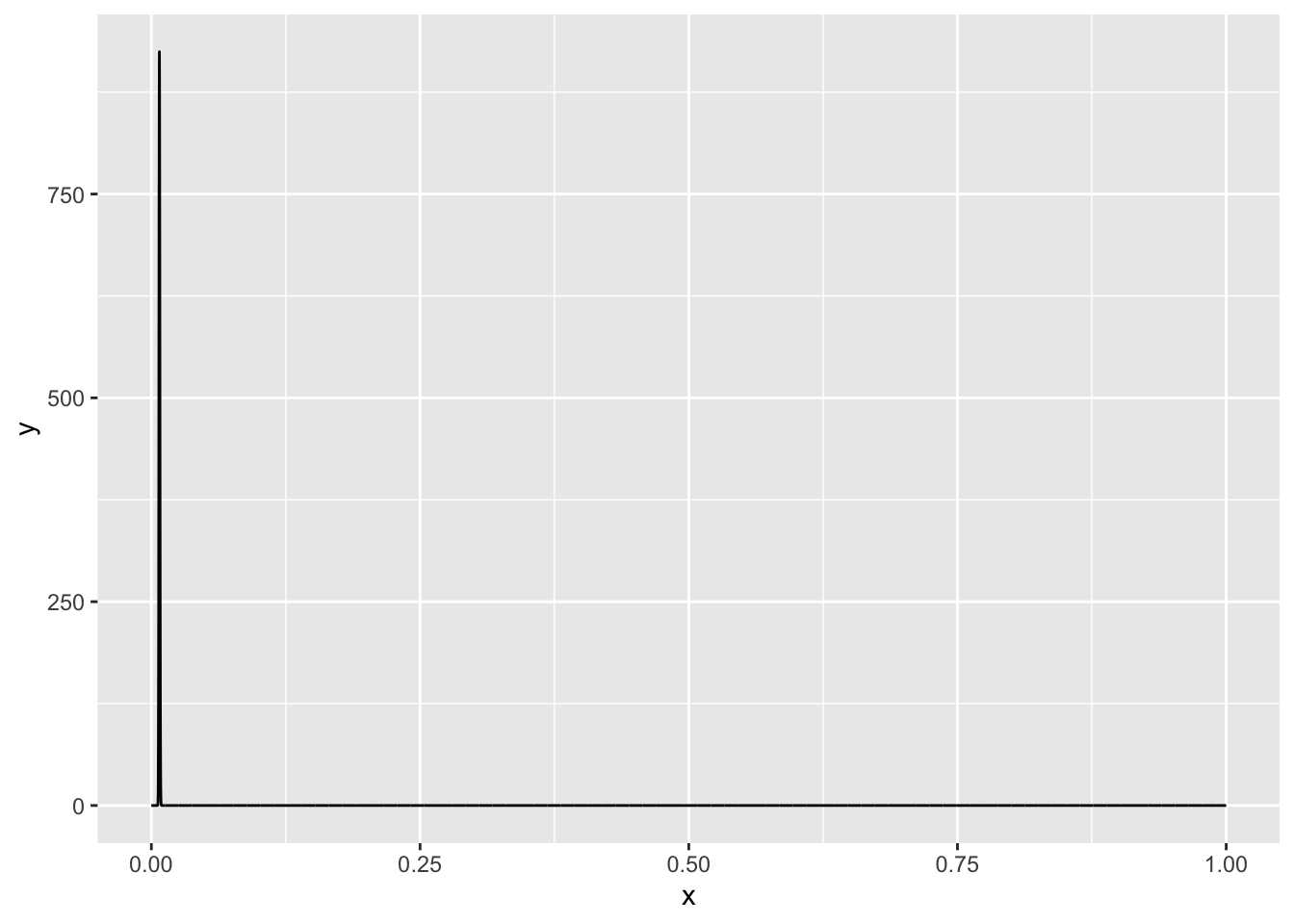
The problem here is that the interesting part of the PDF is very small as we know from the \(\frac{300}{40000} = 0.0075\). Therefore it does not make sense to spread the grid from 0 to 1. We get a much better visualization in the area 0 to 001:
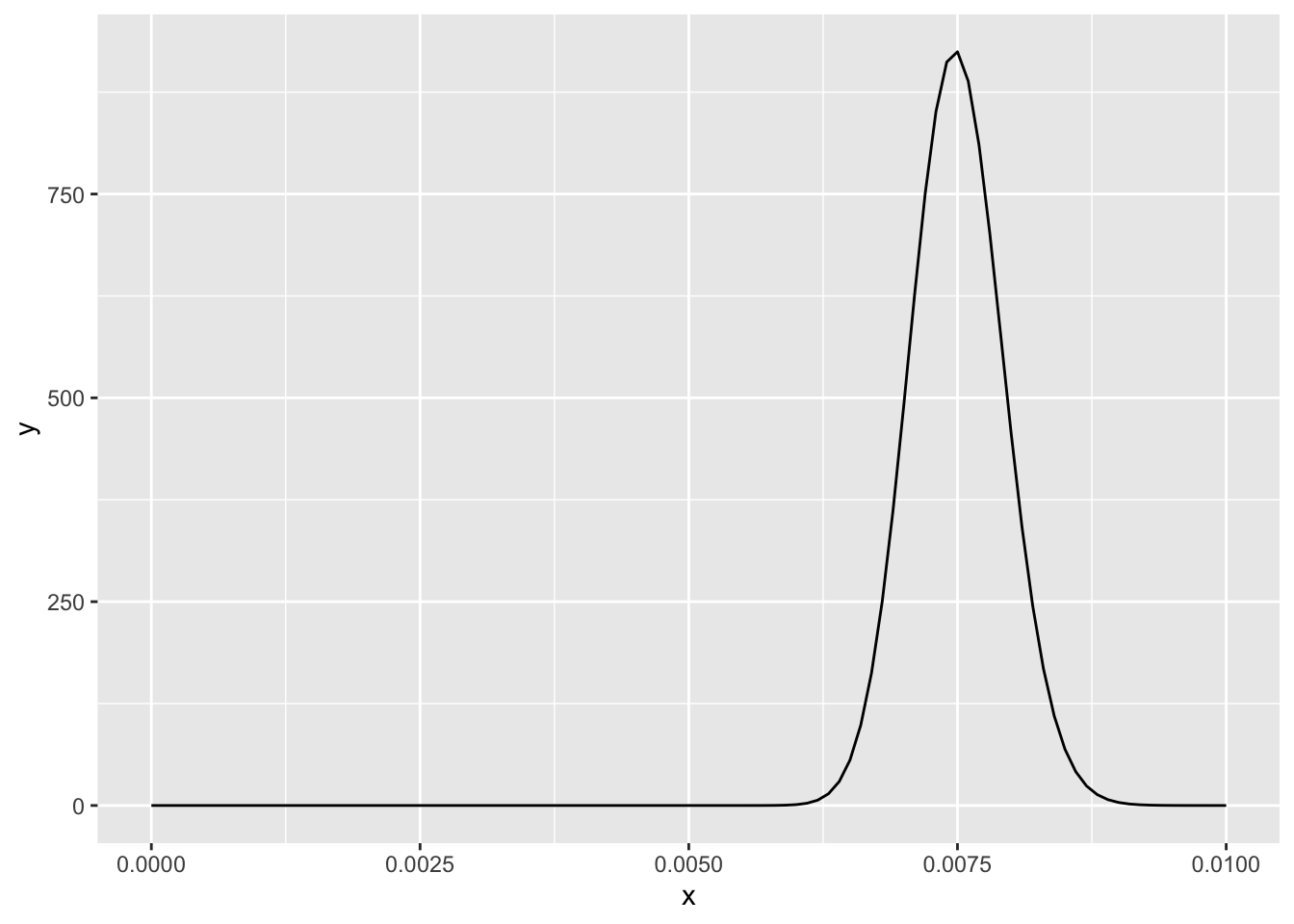
But even this curve is not optimal. Now let’s try the interval [0.005, 0.01]:
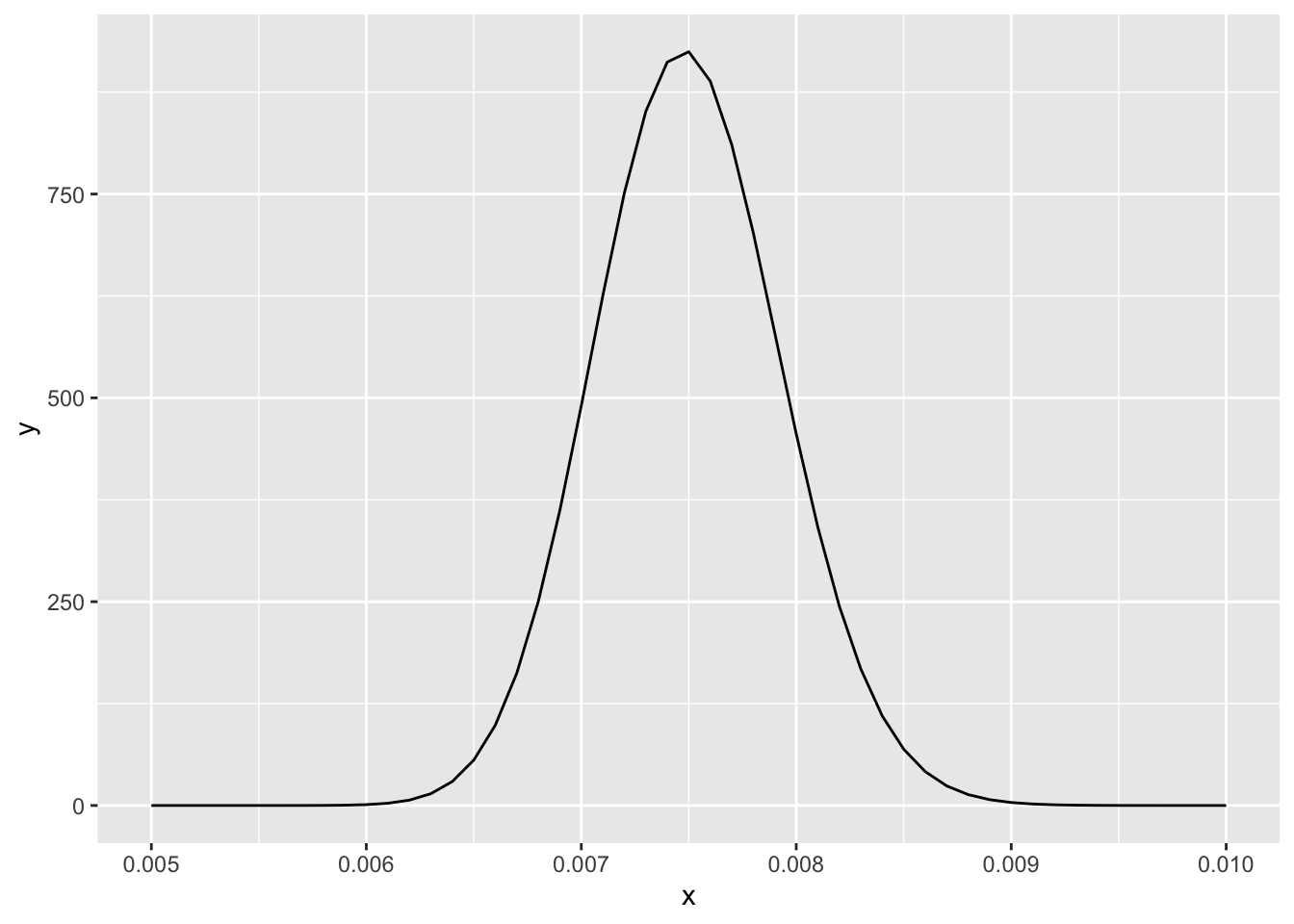
It turns out that this is the interval also used in the book example. But in my visualization you can see some irregularity at the top, because my grid has too coarse. It has only 51 values. Let’s try a much finer grid with 5001 values:
I had to learn about the difference between annotate(geom = "text" …) and annotate(geom = "label" …). There are two big differences:
geom_text() does not understand the fill aesthetics, e.g. you can’t change the background color of the text.geom_label() “is considerable slower than geom_text()” and does not support the check_overlap argument and the angle aesthetic. But more important for my use case geom_label() draws a rectangle around the label. You need to add label.size = NA to remove the label. Although the option label.size is documented (“Size of label border, in mm.”) using NA to remove the border completely is not explained. I had to find out it the hard way via StackOverflow.x_lower <- seq(0.006, 0.0085, 0.0005)
x_upper <- seq(0.0065, 0.009, 0.0005)
text_pos <- seq(0.00625, 0.00875, 0.0005)
colors <- c("gray90", "gray80", "gray70", "gray50", "gray40", "black")
df_13_2 <-
tibble::tibble(x = seq(0.006, 0.009, length.out = 6000),
y = dbeta(x, 300, 39700))
ggplot2::ggplot(df_13_2, ggplot2::aes(x = x, y = y)) +
ggplot2::geom_line() +
ggplot2::geom_area(data = df_13_2 |>
dplyr::filter(x >= x_lower[1] & x < x_upper[1]),
fill = colors[1]
) +
ggplot2::annotate(geom = "label", x = text_pos[1],
size = 5, y = 125, color = "black", fill = "white", label.size = NA,
label = round(integrate(function(x)
dbeta(x, 300, 39700), x_lower[1], x_upper[1])[["value"]], 3)) +
ggplot2::geom_area(data = df_13_2 |>
dplyr::filter(x >= x_lower[2] & x < x_upper[2]),
fill = colors[2]
) +
ggplot2::annotate(geom = "label", x = text_pos[2], size = 5, y = 125, color = "black", fill = "white", label.size = NA,
label = round(integrate(function(x)
dbeta(x, 300, 39700), x_lower[1], x_upper[2])[["value"]], 3)) +
ggplot2::geom_area(data = df_13_2 |>
dplyr::filter(x >= x_lower[3] & x < x_upper[3]),
fill = colors[3]
) +
ggplot2::annotate(geom = "label", x = text_pos[3], size = 5, y = 125, color = "black", fill = "white", label.size = NA,
label = round(integrate(function(x)
dbeta(x, 300, 39700), x_lower[1], x_upper[3])[["value"]], 3)) +
ggplot2::geom_area(data = df_13_2 |>
dplyr::filter(x >= x_lower[4] & x < x_upper[4]),
fill = colors[4]
) +
ggplot2::annotate(geom = "label", x = text_pos[4], size = 5, y = 125, color = "black", fill = "white", label.size = NA,
label = round(integrate(function(x)
dbeta(x, 300, 39700), x_lower[1], x_upper[4])[["value"]], 3)) +
ggplot2::geom_area(data = df_13_2 |>
dplyr::filter(x >= x_lower[5] & x < x_upper[5]),
fill = colors[5]
) +
ggplot2::annotate("label", x = text_pos[5], size = 5, y = 125, color = "black", fill = "white", label.size = NA,
label = round(integrate(function(x)
dbeta(x, 300, 39700), x_lower[1], x_upper[5])[["value"]], 3)) +
ggplot2::geom_area(data = df_13_2 |>
dplyr::filter(x >= x_lower[6] & x < x_upper[6]),
fill = colors[6]
) +
ggplot2::annotate(geom = "label", x = text_pos[6], size = 5, y = 125, color = "black", fill = "white", label.size = NA,
label = round(integrate(function(x)
dbeta(x, 300, 39700), x_lower[1], x_upper[6])[["value"]], 3)) +
ggplot2::theme_bw() +
ggplot2::labs(
title = "Visualizing the cumulative area under the curve",
x = "Probability of Subscription",
y = "Density"
)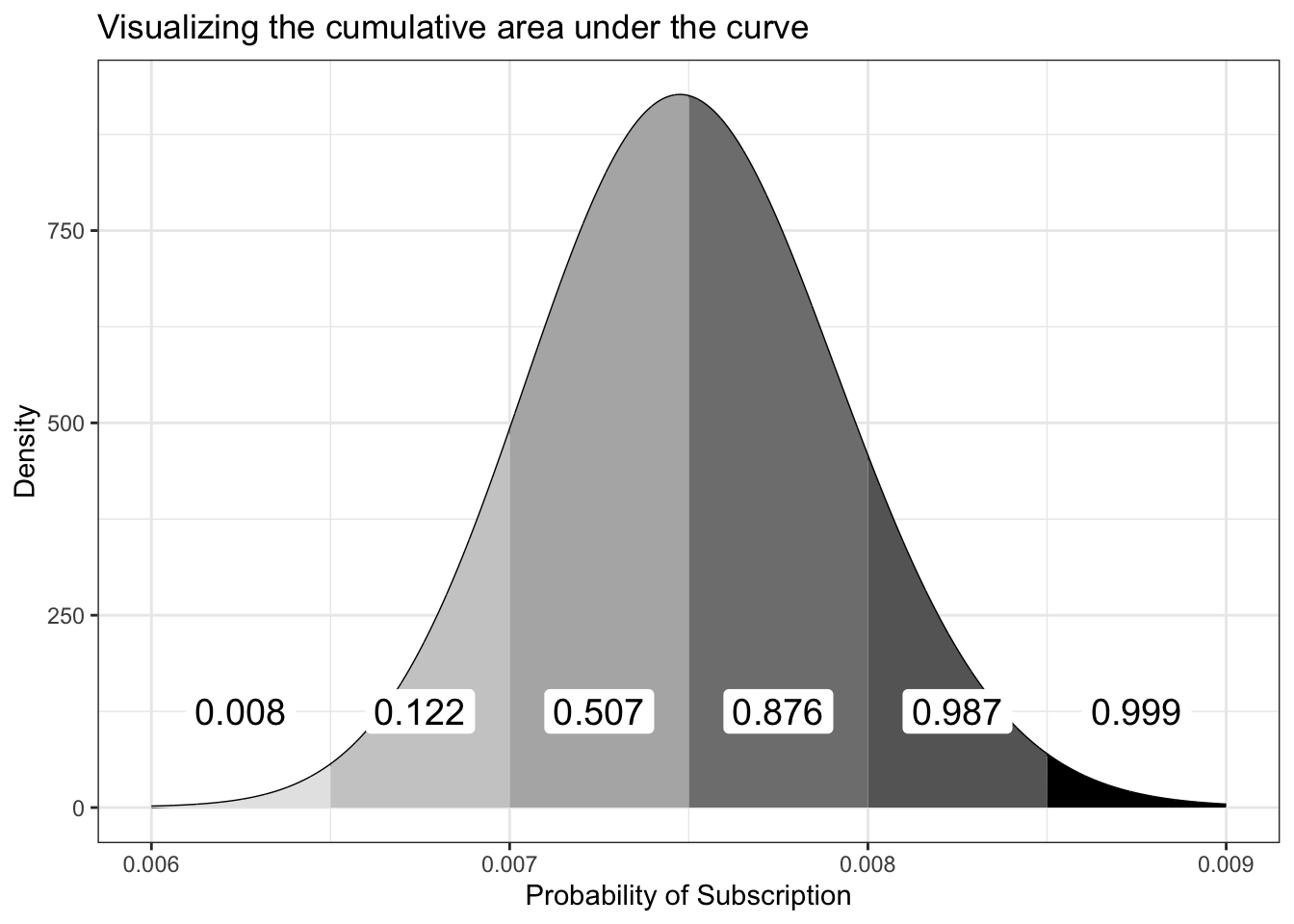
I am very unhappy about the many duplicates of Listing 13.14. I tried to use loops or vectorized commands but the best I found out is Listing 13.15 with has still six duplicate code lines.
x_lower <-  seq(0.006, 0.0085, 0.0005)
x_upper <-  seq(0.0065, 0.009, 0.0005)
label_x_pos <- seq(0.00625, 0.00875, 0.0005)
colors <- c("gray90", "gray80", "gray70", "gray50", "gray40", "black")

cum_rate = 0
for (i in 1:6) {
    cum_rate[i] <-
    round(integrate(function(x)
                      dbeta(x, 300, 39700), x_lower[1], x_upper[i])[["value"]], 3)
}

add_label <- function(x_pos, txt) {
    ggplot2::annotate(
        geom = "label",
        x = x_pos,
        y = 125,
        size = 5,
        label = txt,
        label.size = NA
    )
}


highlight_one_area <- function(df, i) {
        ggplot2::geom_area(data = df |>
                       dplyr::filter(x >= x_lower[i] & x <  x_upper[i]),
                       fill = colors[i])
}


df_13_2 <-
    tibble::tibble(x = seq(0.006, 0.009, length.out = 6000),
                   y = dbeta(x, 300, 39700))


p_13_2 <-
    ggplot2::ggplot(df_13_2, ggplot2::aes(x = x, y = y)) +
    ggplot2::geom_line() +
    highlight_one_area(df_13_2, 1) +
    highlight_one_area(df_13_2, 2) +
    highlight_one_area(df_13_2, 3) +
    highlight_one_area(df_13_2, 4) +
    highlight_one_area(df_13_2, 5) +
    highlight_one_area(df_13_2, 6) +
    add_label(label_x_pos, cum_rate) +
    ggplot2::theme_bw() +
    ggplot2::labs(
        title = "Visualizing the cumulative area under the curve",
        x = "Probability of Subscription",
        y = "Density"
    )

p_13_2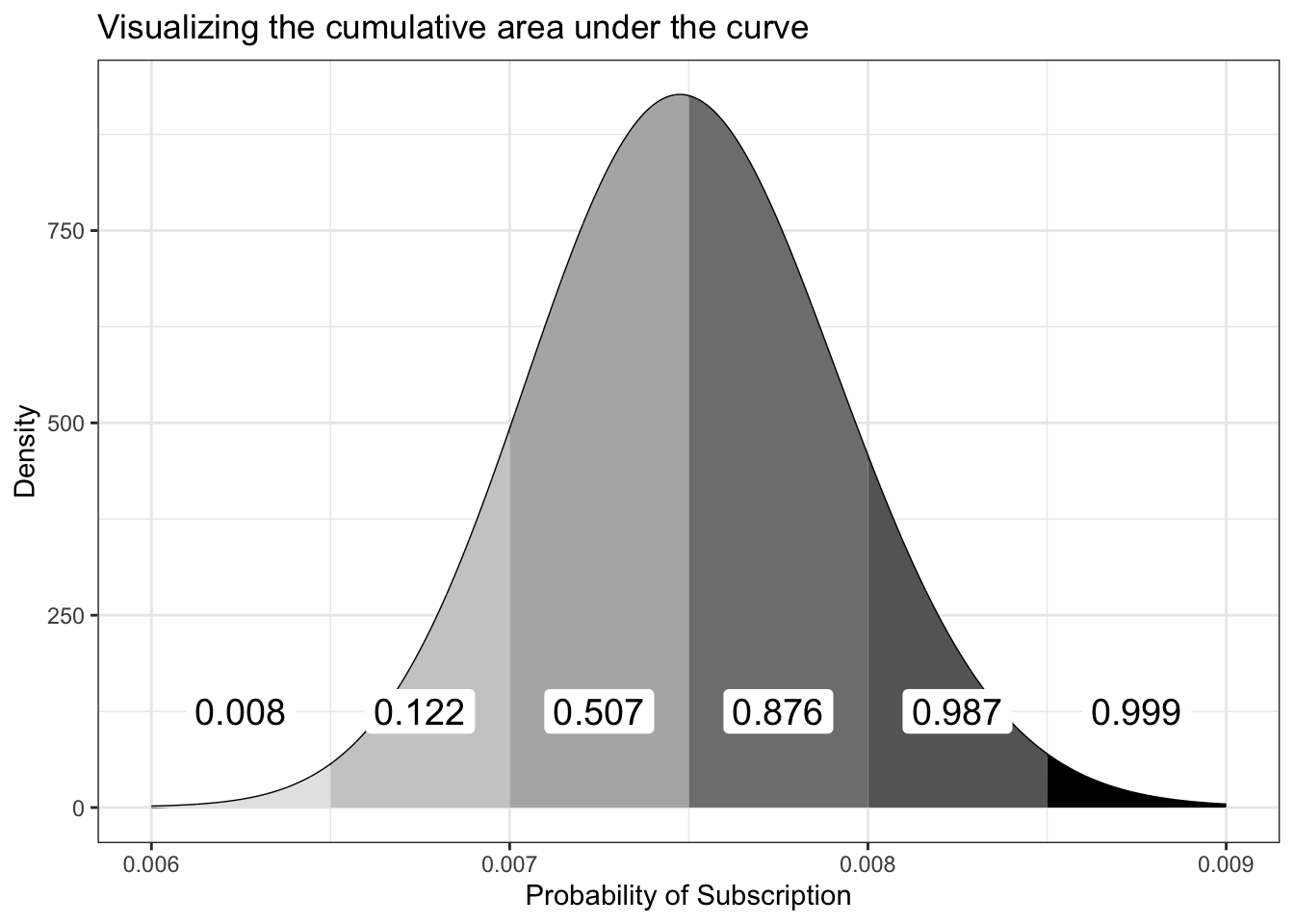
As I could not find a better solution for Listing 13.15 myself I posted my question in StackOverflow and got an answer with two different options within one hour!
The first solution is to use lapply(). I should have known that as I came over a similar solution. The second solution is for me more complex and I have still to study it thoroughly to understand it.
What follows in Listing 13.16 is the modern take of lapply() using the purrr::map() function. (I do not understand why I had to use exactly the argument “df” and asked via SO comment.)
########### Vectors ##############

x_lower <-  seq(0.006, 0.0085, 0.0005)
x_upper <-  seq(0.0065, 0.009, 0.0005)
label_x_pos <- seq(0.00625, 0.00875, 0.0005)
colors <- c("gray90", "gray80", "gray70", "gray50", "gray40", "black")

########### Functions ############


cum_rate = 0
for (i in 1:6) {
    cum_rate[i] <-
    round(integrate(function(x)
                      dbeta(x, 300, 39700), x_lower[1], x_upper[i])[["value"]], 3)
}

add_label <- function(x_pos, txt) {
    ggplot2::annotate(
        geom = "label",
        x = x_pos,
        y = 125,
        size = 5,
        label = txt,
        label.size = NA
    )
}

highlight_areas <- function(df, i) {
        ggplot2::geom_area(data = df |>
                       dplyr::filter(x >= x_lower[i] & x <  x_upper[i]),
                       fill = colors[i])
}

######### Graph plotting ############

df_13_2 <-
    tibble::tibble(x = seq(0.006, 0.009, length.out = 6000),
                   y = dbeta(x, 300, 39700))

p_13_2 <-
    ggplot2::ggplot(df_13_2, ggplot2::aes(x = x, y = y)) +
    ggplot2::geom_line() +
    purrr::map(1:6, highlight_areas, df = df_13_2) +
    add_label(label_x_pos, cum_rate) +
    ggplot2::theme_bw() +
    ggplot2::labs(
        title = "Visualizing the cumulative area under the curve",
        x = "Probability of Subscription",
        y = "Density"
    )

p_13_2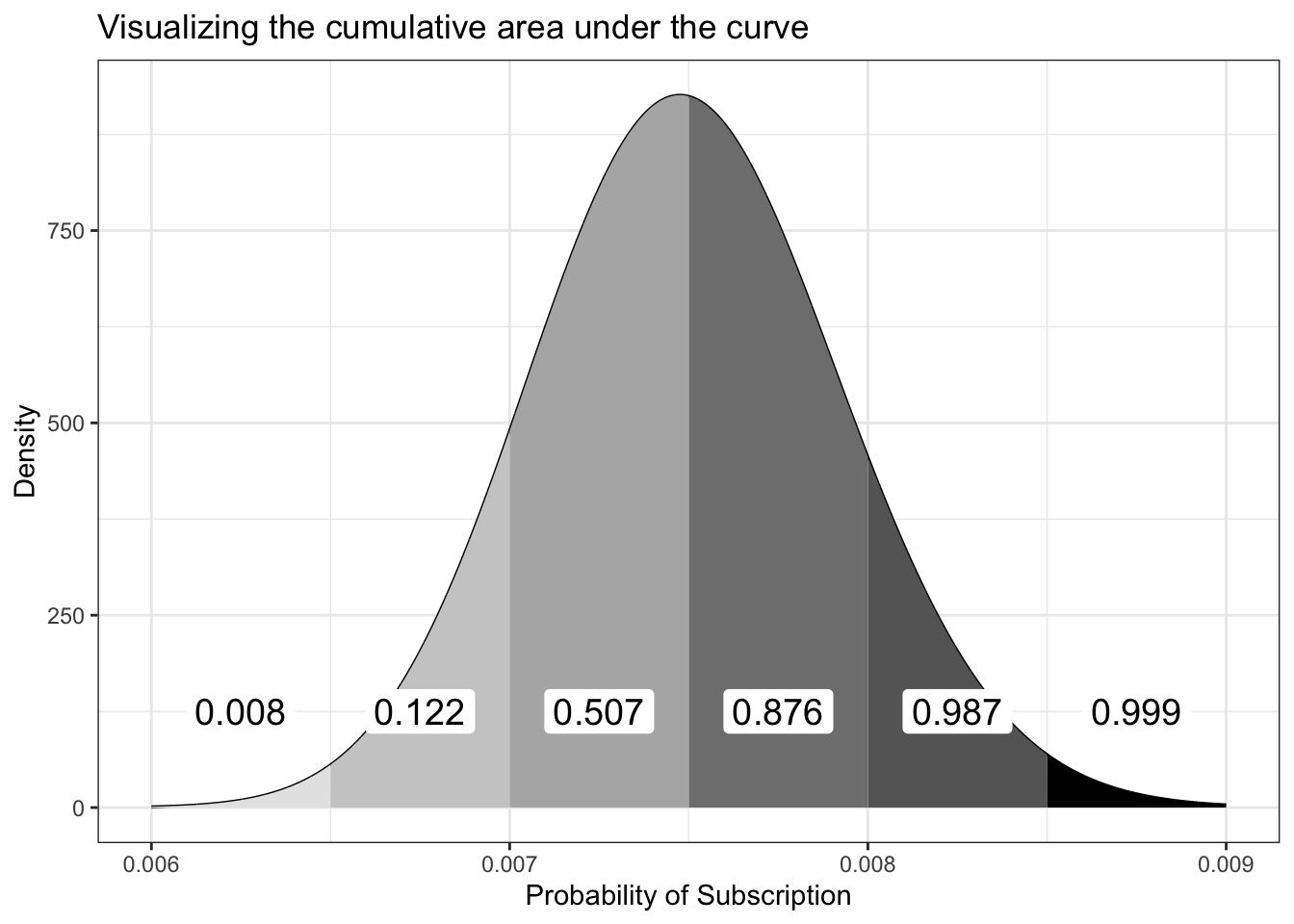
df_13_3 <-
tibble::tibble(x = seq(0.006, 0.009, 0.0005),
               y = pbeta(x, 300, 39700))

    ggplot2::ggplot(df_13_3, ggplot2::aes(x = x, y = y)) +
    ggplot2::geom_point() +
    ggplot2::theme_bw() +
    ggplot2::labs(
        title = "The cumulative distribution function",
        x = "Subscription rate",
        y = "Cumulative Probability"
    )
df_13_4a <-
tibble::tibble(x = seq(0.005, 0.01, 1e-6),
               y = pbeta(x, 300, 39700))

    ggplot2::ggplot(df_13_4a, ggplot2::aes(x = x, y = y)) +
    ggplot2::geom_line() +
    ggplot2::theme_bw() +
    ggplot2::labs(
        title = "The cumulative distribution function",
        x = "Subscription rate",
        y = "Cumulative Probability"
    )
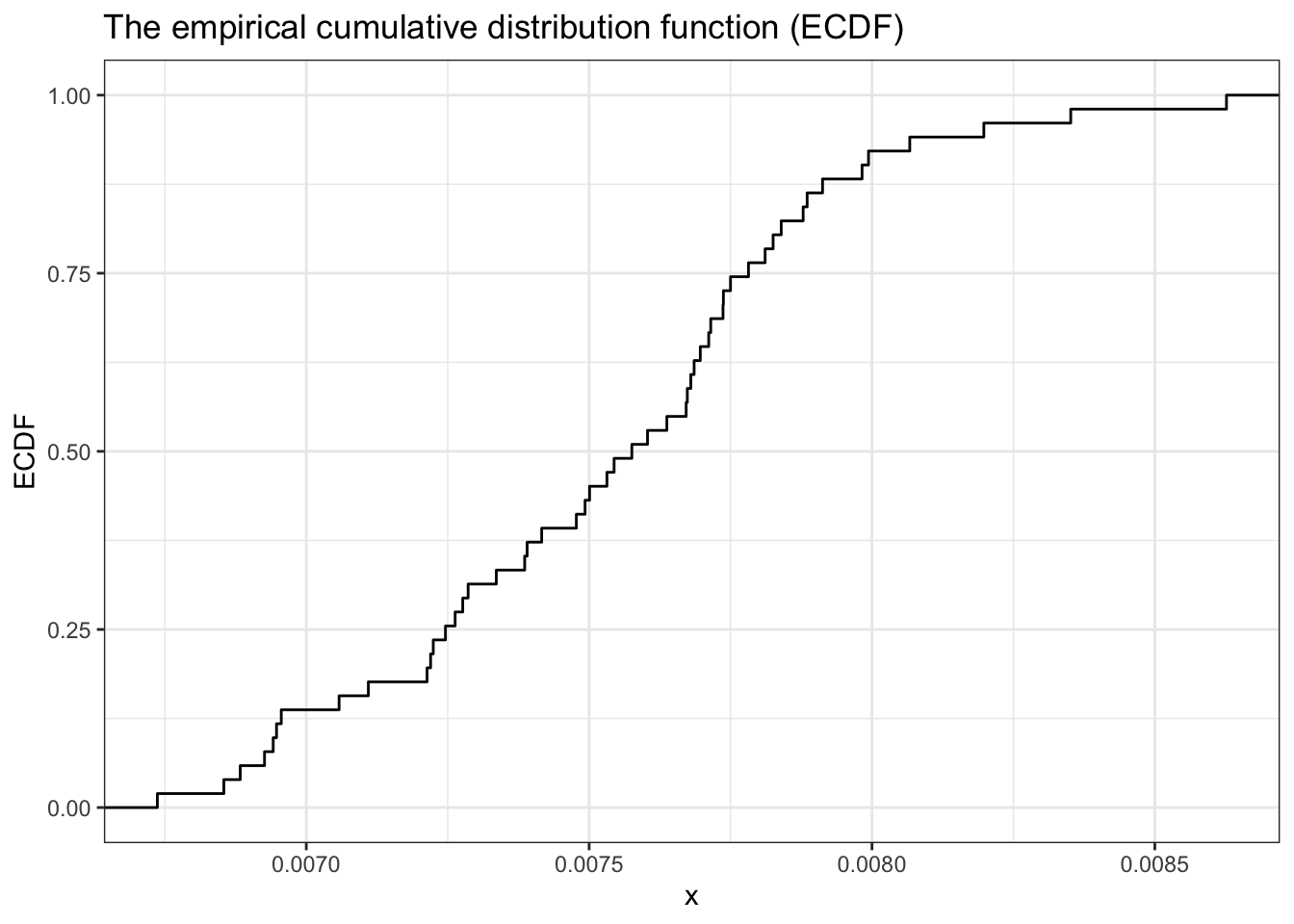
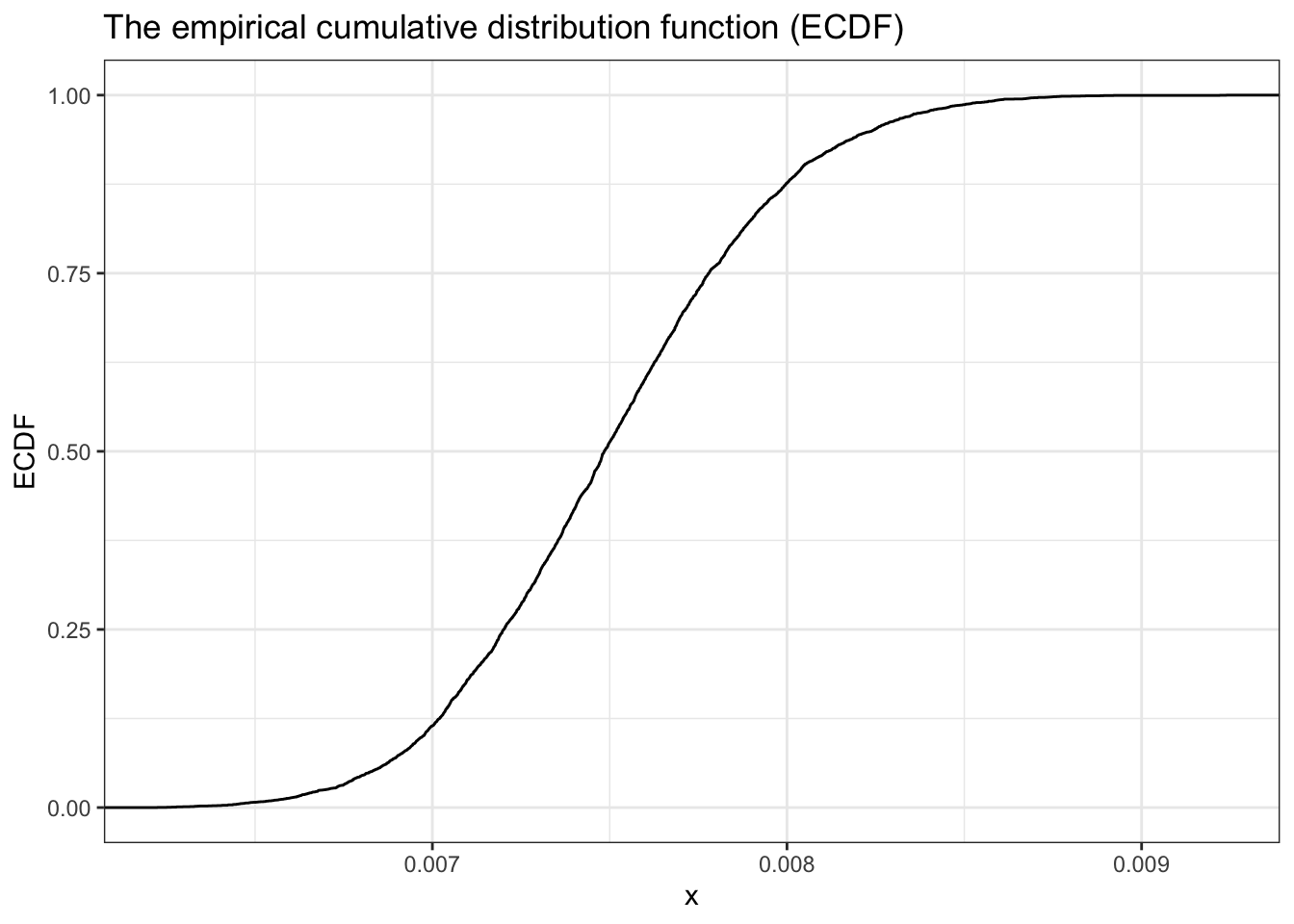
Trying to apply the CDF I noticed that there is also an rglossary(“ECDF”)` (Empirical Cumulative Distribution Function). The differences are that the ECDF is a step function whereas the CDF is smooth. But with many different values the ECDF approximates to ta smooth function.

median_beta <- round(qbeta(0.5, 300, 39700), 5)

df_13_5 <-
tibble::tibble(x = seq(0.005, 0.01, 1e-6),
               y = pbeta(x, 300, 39700))

    ggplot2::ggplot(df_13_5, ggplot2::aes(x = x, y = y)) +
    ggplot2::geom_line() +
    ggplot2::geom_segment(ggplot2::aes(x = 0.005, y = 0.50,
                          xend = median_beta, yend = 0.50),
                          lineend = "square", linejoin = "bevel", color = "steelblue",
                          size = 0.8, arrow = ggplot2::arrow(length = ggplot2::unit(0.5, "cm"))) +
    ggplot2::geom_segment(ggplot2::aes(x = median_beta, y = 0.50,
                      xend = median_beta, yend = 0.00),
                      lineend = "square", linejoin = "bevel", color = "steelblue",
                      size = 0.8, arrow = ggplot2::arrow(length = ggplot2::unit(0.5, "cm"))) +
    ggplot2::annotate("text", y = 0.625, x = 0.0087,
                      label = "median = qbeta(0.5, 300, 39700)") +
        ggplot2::annotate("text", y = 0.55, x = 0.0087,
                      label = glue::glue("= {median_beta}")) +
    ggplot2::theme_bw() +
    ggplot2::labs(
        title = "Estimating median",
        x = "Probability of subscription",
        y = "Cumulative Probability"
    )
#> Warning: Using `size` aesthetic for lines was deprecated in ggplot2 3.4.0.
#> ℹ Please use `linewidth` instead.
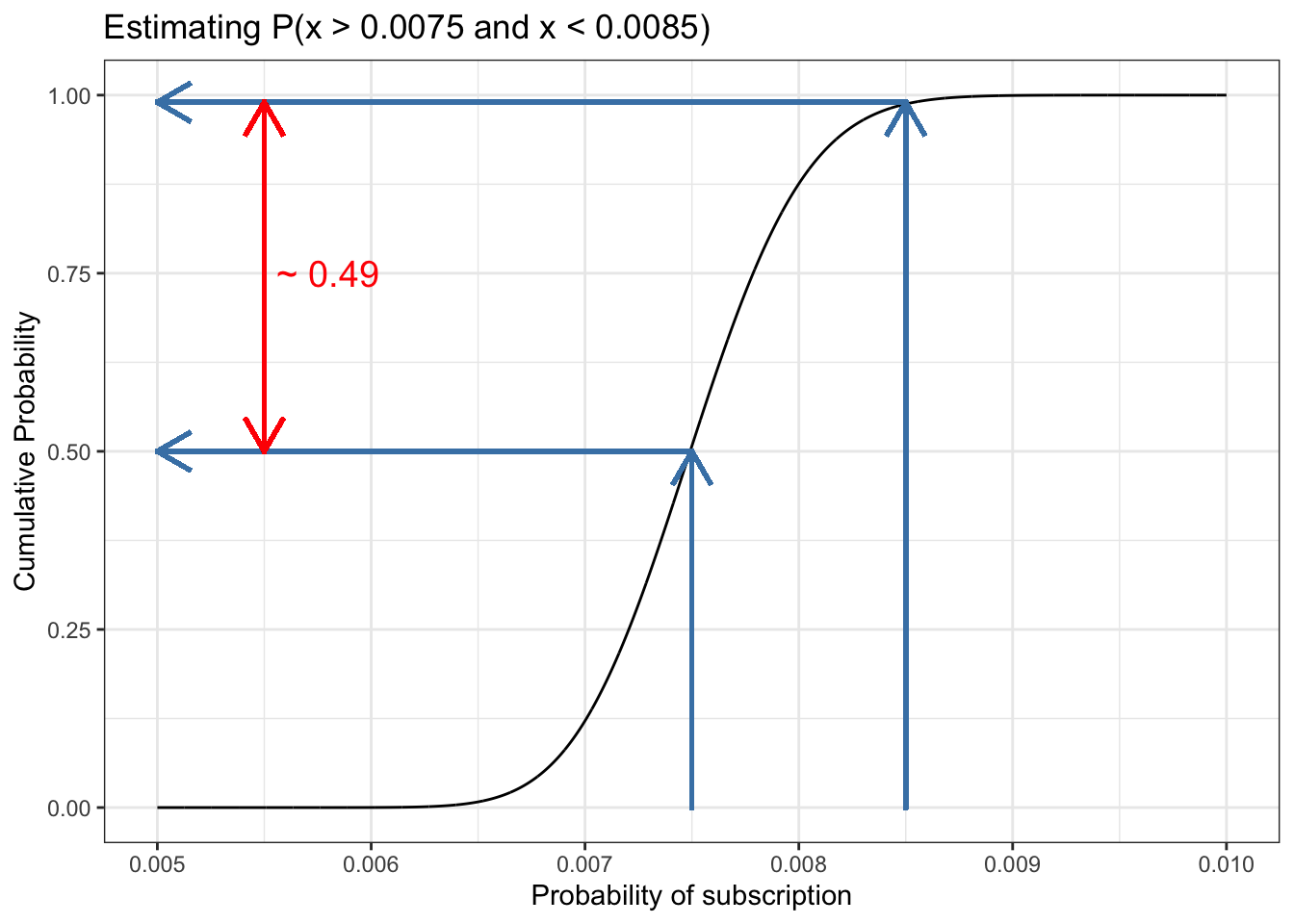
In contrast to Figure 13.17 where I cheated by calculating the median of the beta distribution I will in Section 13.7.6 try to approximate the integration just visually.
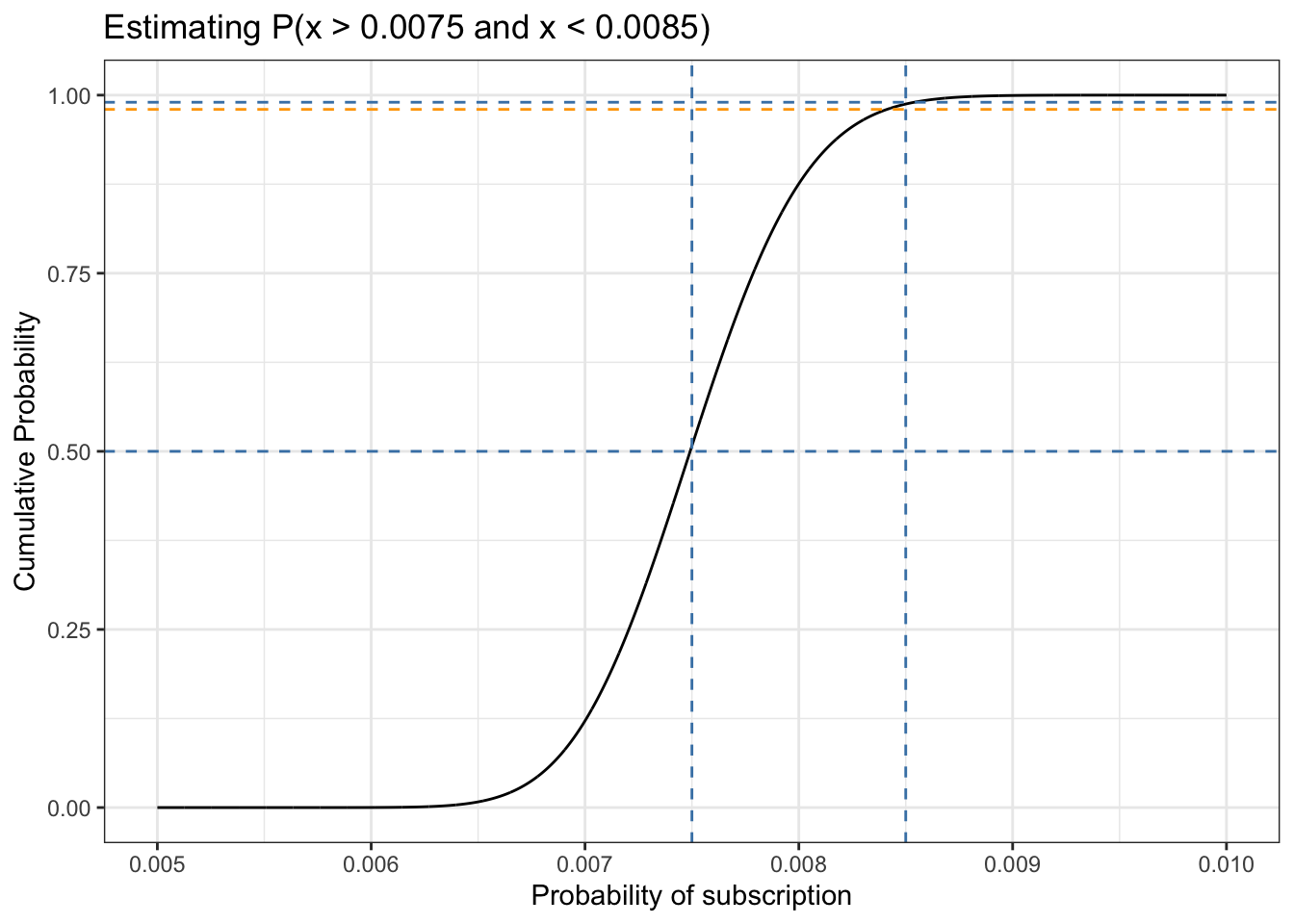
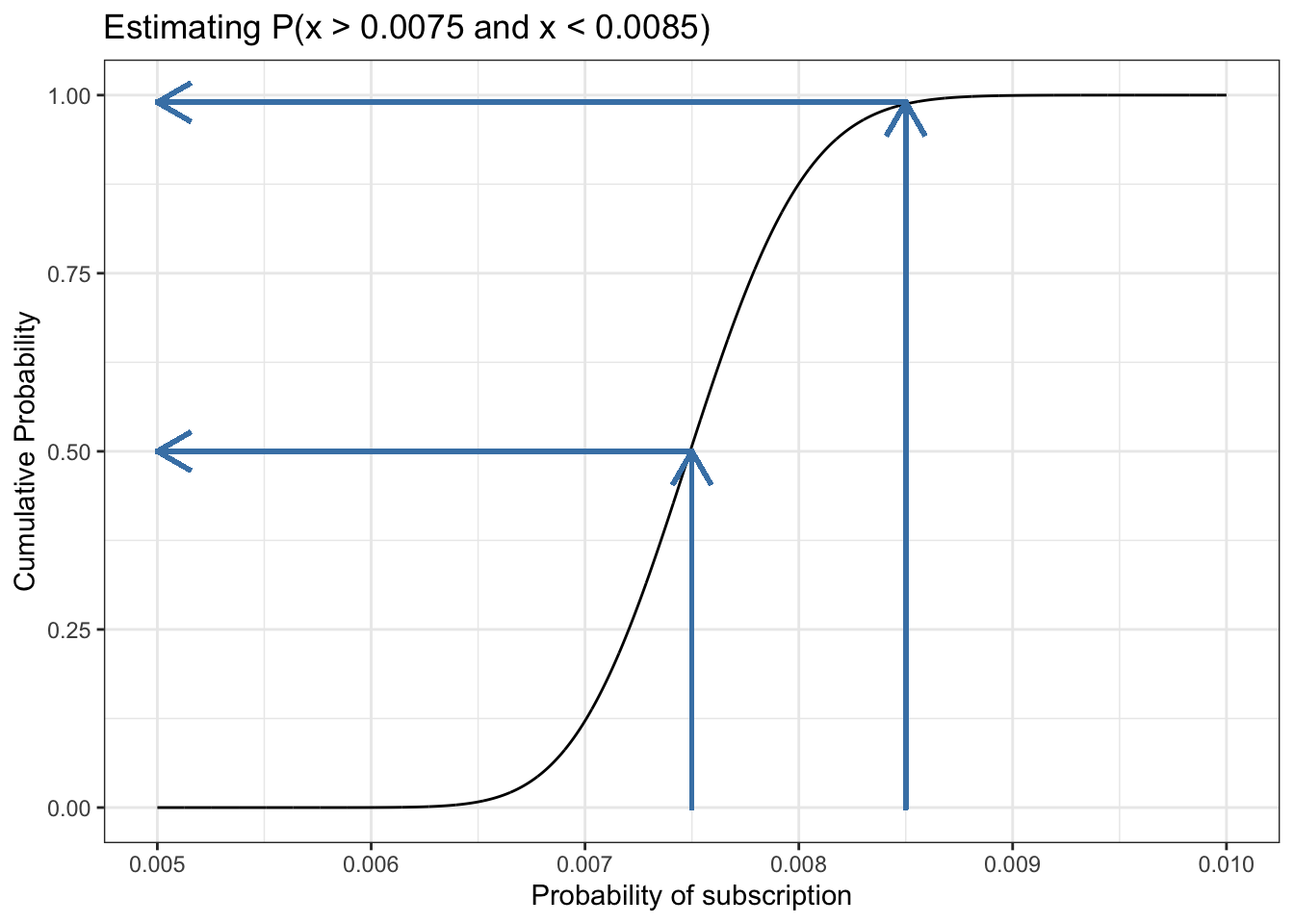
We are going to estimate the range between p(x > 0.0075 and x < 0.0085). The solution could be visually done approximately either with a ruler or (not so exact) just by eyeballing. To do it programmatically without integration is a somewhat complex procedure with four steps:
df_13_6 <-
tibble::tibble(x = seq(0.005, 0.01, 1e-6),
               y = pbeta(x, 300, 39700))

    ggplot2::ggplot(df_13_6, ggplot2::aes(x = x, y = y)) +
    ggplot2::geom_line() +
    ggplot2::geom_vline(xintercept = 0.0075, color = "steelblue",
                        linetype = "dashed") +
    ggplot2::geom_vline(xintercept = 0.0085, color = "steelblue",
                        linetype = "dashed") +
    ggplot2::theme_bw() +
    ggplot2::labs(
        title = "Estimating P(x > 0.0075 and x < 0.0085)",
        x = "Probability of subscription",
        y = "Cumulative Probability"
    )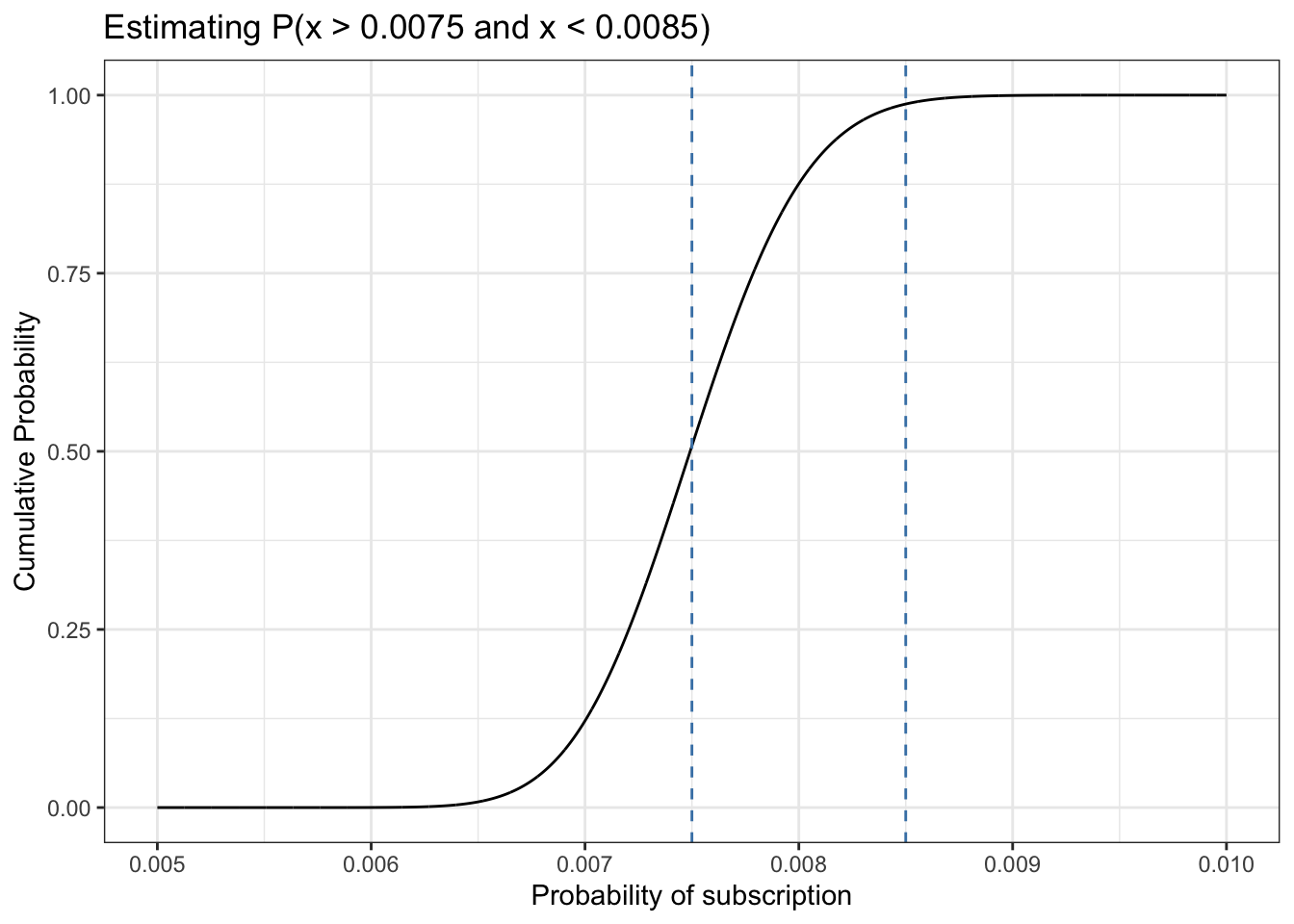
The lower cumulative probability is almost exact 0.5 as I can see and already know from Figure 13.17. Without knowing the solution in the book my first approach was to draw a line at 0.98% of the CDF (orange). As this seems a little to less a tried with it .99%
df_13_6 <-
tibble::tibble(x = seq(0.005, 0.01, 1e-6),
               y = pbeta(x, 300, 39700))

    ggplot2::ggplot(df_13_6, ggplot2::aes(x = x, y = y)) +
    ggplot2::geom_line() +
    ggplot2::geom_vline(xintercept = 0.0075, color = "steelblue",
                        linetype = "dashed") +
    ggplot2::geom_vline(xintercept = 0.0085, color = "steelblue",
                        linetype = "dashed") +

    ggplot2::geom_hline(yintercept = 0.5, color = "steelblue",
                    linetype = "dashed") +
    ggplot2::geom_hline(yintercept = 0.98, color = "orange",
        linetype = "dashed") +
    ggplot2::geom_hline(yintercept = 0.99, color = "steelblue",
            linetype = "dashed") +
    ggplot2::theme_bw() +
    ggplot2::labs(
        title = "Estimating P(x > 0.0075 and x < 0.0085)",
        x = "Probability of subscription",
        y = "Cumulative Probability"
    )
df_13_6 <-
tibble::tibble(x = seq(0.005, 0.01, 1e-6),
               y = pbeta(x, 300, 39700))

    ggplot2::ggplot(df_13_6, ggplot2::aes(x = x, y = y)) +
    ggplot2::geom_line() +
    ggplot2::geom_segment(
          ggplot2::aes(xend = 0.005, yend = 0.50,
              x = 0.00750, y = 0.50),
              lineend = "square", linejoin = "bevel", color = "steelblue",
              size = 0.8, arrow = ggplot2::arrow(length = ggplot2::unit(0.5, "cm"))) +
    ggplot2::geom_segment(
          ggplot2::aes(xend = 0.0075, yend = 0.50,
              x = 0.0075, y = 0.00),
              lineend = "square", linejoin = "bevel", color = "steelblue",
              size = 0.8, arrow = ggplot2::arrow(length = ggplot2::unit(0.5, "cm"))) +

    ggplot2::geom_segment(
          ggplot2::aes(x = 0.0085, y = 0,
              xend = 0.0085, yend = 0.99),
              lineend = "square", linejoin = "bevel", color = "steelblue",
              size = 0.8, arrow = ggplot2::arrow(length = ggplot2::unit(0.5, "cm"))) +
    ggplot2::geom_segment(
          ggplot2::aes(x = 0.0085, y = 0.99,
              xend = 0.005, yend = 0.99),
              lineend = "square", linejoin = "bevel", color = "steelblue",
              size = 0.8, arrow = ggplot2::arrow(length = ggplot2::unit(0.5, "cm"))) +

    ggplot2::theme_bw() +
    ggplot2::labs(
        title = "Estimating P(x > 0.0075 and x < 0.0085)",
        x = "Probability of subscription",
        y = "Cumulative Probability"
    )
df_13_6 <-
tibble::tibble(x = seq(0.005, 0.01, 1e-6),
               y = pbeta(x, 300, 39700))

    ggplot2::ggplot(df_13_6, ggplot2::aes(x = x, y = y)) +
    ggplot2::geom_line() +
    ggplot2::geom_segment(
          ggplot2::aes(xend = 0.005, yend = 0.50,
              x = 0.00750, y = 0.50),
              lineend = "square", linejoin = "bevel", color = "steelblue",
              size = 0.8, arrow = ggplot2::arrow(length = ggplot2::unit(0.5, "cm"))) +
    ggplot2::geom_segment(
          ggplot2::aes(xend = 0.0075, yend = 0.50,
              x = 0.0075, y = 0.00),
              lineend = "square", linejoin = "bevel", color = "steelblue",
              size = 0.8, arrow = ggplot2::arrow(length = ggplot2::unit(0.5, "cm"))) +

    ggplot2::geom_segment(
          ggplot2::aes(x = 0.0085, y = 0,
              xend = 0.0085, yend = 0.99),
              lineend = "square", linejoin = "bevel", color = "steelblue",
              size = 0.8, arrow = ggplot2::arrow(length = ggplot2::unit(0.5, "cm"))) +
    ggplot2::geom_segment(
          ggplot2::aes(x = 0.0085, y = 0.99,
              xend = 0.005, yend = 0.99),
              lineend = "square", linejoin = "bevel", color = "steelblue",
              size = 0.8, arrow = ggplot2::arrow(length = ggplot2::unit(0.5, "cm"))) +

    ggplot2::geom_segment(
          ggplot2::aes(x = 0.0055, y = 0.5,
              xend = 0.0055, yend = 0.99),
              lineend = "square", linejoin = "bevel", color = "red",
              size = 0.8, arrow = ggplot2::arrow(length = ggplot2::unit(0.5, "cm"))) +
    ggplot2::geom_segment(
          ggplot2::aes(xend = 0.0055, yend = 0.5,
              x = 0.0055, y = 0.99),
              lineend = "square", linejoin = "bevel", color = "red",
              size = 0.8, arrow = ggplot2::arrow(length = ggplot2::unit(0.5, "cm"))) +
    ggplot2::annotate("text", x = 0.0058, y = 0.75,
                      label = "~ 0.49", color = "red", size = 5) +

    ggplot2::theme_bw() +
    ggplot2::labs(
        title = "Estimating P(x > 0.0075 and x < 0.0085)",
        x = "Probability of subscription",
        y = "Cumulative Probability"
    )
There is nothing new for approximating the range that covers 80 percent of the possible values for the true conversion rate. We use the same strategy as in Section 13.7.6 but this time starting from the y-axis:
df_13_7 <-
tibble::tibble(x = seq(0.005, 0.01, 1e-6),
               y = pbeta(x, 300, 39700))

    ggplot2::ggplot(df_13_7, ggplot2::aes(x = x, y = y)) +
    ggplot2::geom_line() +
    ggplot2::geom_segment(
          ggplot2::aes(xend = 0.007, yend = 0.125,
              x = 0.005, y = 0.125),
              lineend = "square", linejoin = "bevel", color = "steelblue",
              size = 0.6, arrow = ggplot2::arrow(length = ggplot2::unit(0.5, "cm"))) +
    ggplot2::geom_segment(
          ggplot2::aes(xend = 0.0080, yend = 0.875,
              x = 0.005, y = 0.875),
              lineend = "square", linejoin = "bevel", color = "steelblue",
              size = 0.6, arrow = ggplot2::arrow(length = ggplot2::unit(0.5, "cm"))) +

    ggplot2::geom_segment(
          ggplot2::aes(x = 0.007, y = 0.125,
              xend = 0.007, yend = 0.0),
              lineend = "square", linejoin = "bevel", color = "steelblue",
              size = 0.6, arrow = ggplot2::arrow(length = ggplot2::unit(0.5, "cm"))) +
    ggplot2::geom_segment(
          ggplot2::aes(x = 0.008, y = 0.875,
              xend = 0.008, yend = 0.0),
              lineend = "square", linejoin = "bevel", color = "steelblue",
              size = 0.6, arrow = ggplot2::arrow(length = ggplot2::unit(0.5, "cm"))) +


    ggplot2::theme_bw() +
    ggplot2::labs(
        title = "Estimating 80% Confidence Interval",
        x = "Probability of subscription",
        y = "Cumulative Probability"
    )
df_13_8 <-
tibble::tibble(x = seq(0, 1, 1e-4),
               y = qbeta(x, 300, 39700))

    ggplot2::ggplot(df_13_8, ggplot2::aes(x = x, y = y)) +
    ggplot2::ylim(0.006, 0.009) +
    ggplot2::geom_line() +
    ggplot2::theme_bw() +
    ggplot2::labs(
        title = "Quantile Function Beta(300, 39700)",
        x = "Subscription rate",
        y = "Cumulative Probability"
    )
#> Warning: Removed 7 rows containing missing values (`geom_line()`).